CKAD: Second Mock Challenge
What is CKAD for?
A certified Kubernetes Application Developer (CKAD) can design, build and deploy cloud-native applications for Kubernetes. He can define application resources and use Kubernetes core primitives to create/migrate, configure, expose and observe scalable applications. CKAD certificate is valid for two years.
Any successful candidate will be comfortable:
- working with (OCI-compliant) container images
- applying Cloud Native application concepts and architectures – working with and validating Kubernetes resource definitions
I’m currently preparing for my Certified Kubernetes Application Developer (CKAD). This free challenge is from the kodecloud.com.
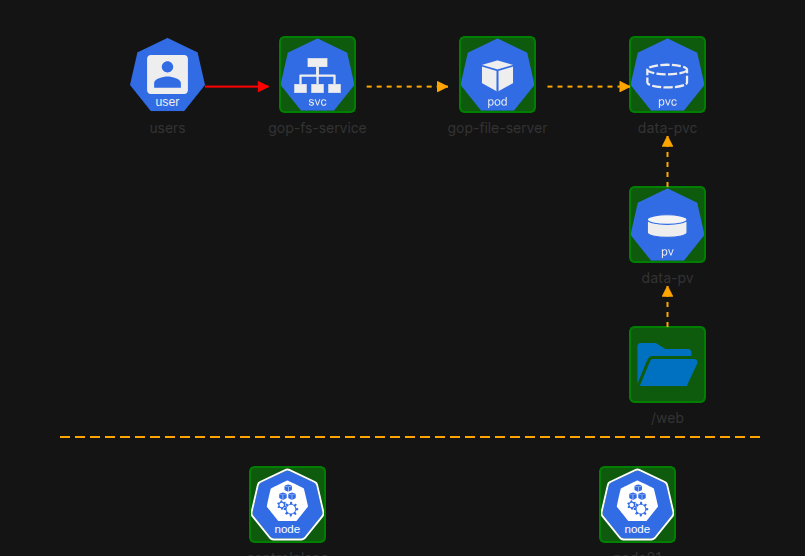
Change coredns image
kubectl set image deployment/coredns \
  coredns=registry.k8s.io/coredns/coredns:v1.8.6 -n kube-system
Troubleshoot controlplane
Find the process ID of the kube-apiserver
➜ crictl ps -a | grep kube-apiserver
a0fecb3b907b7       c42f13656d0b2       About a minute ago   Exited              kube-apiserver            8                   f26f52bcb6f08       kube-apiserver-controlplane
➜ crictl logs a0fecb3b907b7
I1009 20:45:09.828623       1 options.go:221] external host was not specified, using 10.244.30.163
I1009 20:45:09.829302       1 server.go:148] Version: v1.30.0
I1009 20:45:09.829338       1 server.go:150] "Golang settings" GOGC="" GOMAXPROCS="" GOTRACEBACK=""
E1009 20:45:10.079433       1 run.go:74] "command failed" err="open /etc/kubernetes/pki/ca-authority.crt: no such file or directory"
The issue here is that ca-authority.crt doesn’t exist. If you check /etc/kubernetes/pki, you should find ca.crt as the correct certificate.
Edit kube-apiserver.yaml
Please backup kube-apiserver.yaml first before modifying the file. kube-apiserver will not start if you made a mistake and your backup is your way to recover.
apiVersion: v1
kind: Pod
metadata:
  annotations:
    kubeadm.kubernetes.io/kube-apiserver.advertise-address.endpoint: 10.244.30.163:6443
  creationTimestamp: null
  labels:
    component: kube-apiserver
    tier: control-plane
  name: kube-apiserver
  namespace: kube-system
spec:
  containers:
  - command:
    - kube-apiserver
    - --advertise-address=10.244.30.163
    - --allow-privileged=true
    - --authorization-mode=Node,RBAC
    - --client-ca-file=/etc/kubernetes/pki/ca.crt
Copy media files
From controlplane, copy files to node01.
➜ scp /media/*.png node01:/web
kodekloud-ckad.png                  100%   58KB  22.9MB/s   00:00
kodekloud-cka.png                   100%   57KB  41.0MB/s   00:00
kodekloud-cks.png                   100%   61KB  40.3MB/s   00:00
To check, ssh to node01, then view the files.
➜ ssh node01
Last login: Fri Oct  9 20:51:12 2026 from 10.244.30.163

➜ ls -l /web
total 184
-rw-r--r-- 1 root root 58450 Oct  9 20:53 kodekloud-cka.png
-rw-r--r-- 1 root root 59809 Oct  9 20:53 kodekloud-ckad.png
-rw-r--r-- 1 root root 62223 Oct  9 20:53 kodekloud-cks.png
Persistent volume
apiVersion: v1
kind: PersistentVolume
metadata:
  name: data-pv
spec:
  capacity:
    storage: 1Gi
  accessModes:
    - ReadWriteMany
  hostPath:
    path: /web
Persistent volume claim
apiVersion: v1
kind: PersistentVolumeClaim
metadata:
  name: data-pvc
spec:
  accessModes:
    - ReadWriteMany
  resources:
    requests:
      storage: 1Gi
  volumeName: data-pv
Pod with toleration
apiVersion: v1
kind: Pod
metadata:
  name: gop-file-server
  labels:
    app: file-server
spec:
  volumes:
  - name: data-store
    persistentVolumeClaim:
      claimName: data-pvc
  containers:
  - name: gop-file-server
    image: kodekloud/fileserver
    volumeMounts:
    - name: data-store
      mountPath: /web
  tolerations:
  - key: node-role.kubernetes.io/control-plane
    operator: Exists
    effect: NoSchedule
Service
apiVersion: v1
kind: Service
metadata:
  labels:
    app: file-server
  name: gop-fs-service
spec:
  ports:
  - port: 8080
    protocol: TCP
    targetPort: 8080
  selector:
    app: file-server